



Skip to content
View in the app

A better way to browse. Learn more.

HardwarePremium - Comunidad de Compra-Venta

A full-screen app on your home screen with push notifications, badges and more.

To install this app on iOS and iPadOS
  1. Tap the Share icon in Safari
  2. Scroll the menu and tap Add to Home Screen.
  3. Tap Add in the top-right corner.
To install this app on Android
  1. Tap the 3-dot menu (⋮) in the top-right corner of the browser.
  2. Tap Add to Home screen or Install app.
  3. Confirm by tapping Install.

[Vendo] Equipo de sobremesa completo + opcional monitor
Featured Replies

Publicado

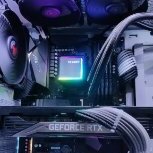
PC para jugar compuesto por:
- Procesador: AMD Ryzen 5600x
- Placa: Aorus x570 ELITE
- Gráfica: RTX 3080 ti
- RAM: 4 x 8 GB Crucial Ballistix 3600 MHz
- Refrigeración Líquida: Be quiet! Silent Loop 2 de 360mm
- Fuente de alimentación: Be quiet! Dark Power 12 750W
- Chasis: Be quiet! Pure Base 500 DX
- Disco duro NVME Sabrent Rocket 1 TB
- Ventiladores 2 x Be quiet! Silent Wings
- Extensiones para cables de fuente de alimentación
-Por 130 euros mas se incluye monitor LG IPS 1440p 144Hz para que te lleves el pack completo a tu casa y puedas llegar y jugar.


PRECIO: 900 Euros

1000053536.jpeg

IMG_4816.jpeg

  • Colla7o ha bloqueado este tema
Invitado
Este tema está cerrado a nuevas respuestas.
Background Picker
Customize Layout

Account

Navigation

Buscar

Buscar

Configure browser push notifications

Chrome (Android)
  1. Tap the lock icon next to the address bar.
  2. Tap Permissions → Notifications.
  3. Adjust your preference.
Chrome (Desktop)
  1. Click the padlock icon in the address bar.
  2. Select Site settings.
  3. Find Notifications and adjust your preference.
